 Loading... Please wait...

Add to Wish List
 New Products
-
 $24.95
-
$24.95
-
$24.95
-
$24.95
-
$24.95
- Home
- Volvo Individual Publications
- Volvo S80 1998 to 2016 (TP-51963e)
- Home
- Volvo Individual Publications
- Publications by Model
- Volvo S80 1998 to 2016 (TP-51963e)
- Home
- Volvo
- Volvo Individual Publications
- Volvo S80 1998 to 2016 (TP-51963e)
- Home
- Volvo
- Volvo Individual Publications
- Publications by Model
- Volvo S80 1998 to 2016 (TP-51963e)
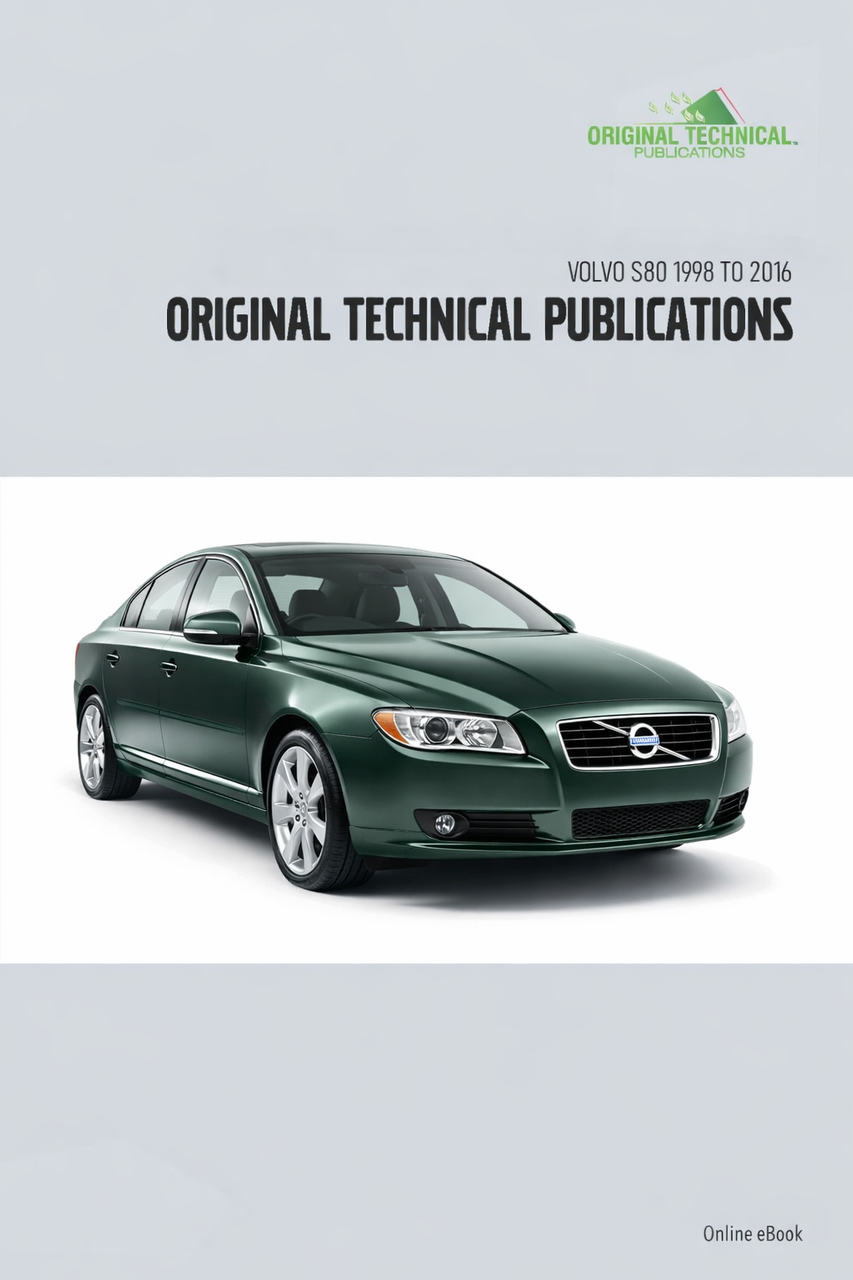
Volvo S80 1998 to 2016 (TP-51963e)


Product Description
Product Description
Models covered:
Volvo S80 1998 to 2016 (TP-51963)
Languages: Languages: English
Contents:
Volvo S80 1998 to 2016 (TP-51963)
Service Publications (service)
Complete Service Manual –S80 2000 – 2007 (S80WKSM)
Electrical Diagrams
Wiring Diagrams - Volvo S60/S60R/S80 V70/V70R/XC70/XC90 2005 Supplement (TP-3985202)
Wiring Diagrams - Volvo S60/S60R/S80 2005(TP-3976202)
Wiring Diagrams - Volvo S80 Premier (TP-3979202)
Wiring Diagrams - Volvo S60/S60R/S80 2006 (TP-3988202)
Wiring Diagrams - Volvo S80 (07-) 2007 (TP-39100202)
Wiring Diagrams- Volvo S80 (07-) 2007 Supplement Late Editon (TP-39119202)
Wiring Diagrams - Volvo S80L 2009 Supplement (TP-39145202)
Wiring Diagrams - Volvo V70 (08-), XC70 (08-) & S80 (07-) 2010 (TP-39152202)
Wiring Diagrams - Volvo V70 (08-), XC70 (08-) & S80 (07-) 2010 Supplement Late Edition (TP-39161202)
Wiring Diagrams- Volvo S80L 2010 Supplement (TP-39159202)
Wiring Diagrams - Volvo V70 (08-), XC70 (08-) & S80 (07-) 2011 (TP-39180202)
Wiring Diagrams - Volvo V70 (08-), XC70 (08-) & S80 (07-) 2011 Supplement (TP-39194202)
Wiring Diagrams - Volvo S60 (11-), V60, XC60, V70 (08-), XC70 (08-), S80 (07-) 2012
Supplement Late Edition (TP-39233202)
Wiring Diagrams- Volvo S80L 2012 Supplement (TP-39216202)
Wiring Diagrams - Volvo S60 (11-), V60, XC60, S80 (07-), V70 (08-) & XC70 2013
Structure week 12w46 (TP-39260202)
Wiring Diagrams - Volvo V70 (08-), XC70 (08-) & S80 (07-) 2013 Structure week 12w20 (TP-39251202)
Wiring Diagrams - Volvo S80L 2013 Structure week 13w35 (TP-39268202)
Wiring Diagrams - Volvo V70 (08-), XC70 (08-) & S80 (07-) 2014 Structure week 13w20 (TP-39264202)
Wiring Diagrams - Volvo V70 (08-), XC70 (08-) & S80 (07-) 2014 Structure week 13w46 (TP-39272202)
Wiring Diagrams - Volvo V70 (08-) & S80 (07-) 2008 (TP-39115202)
Wiring Diagrams - Volvo V70 (08-), XC70 (08-) & S80 (07-) 2008 Supplement Late Edition (TP-39127202)
Wiring Diagrams - Volvo V70 (08-), XC70 (08-) & S80 (07-) 2009 (TP-39128202)
Wiring Diagrams - Volvo V70 (08-), XC70 (08-) & S80 (07-) 2009 Supplement Late Edition (TP-39138202)
Owners Publications
Volvo S80 (1998 to 2006)(GENERATION 1)(TP-51963)
Owner’s Manuals and Instruction Books (English)
Owner’s Manual- S80 1999 (Canada & USA) AT9850 10.000.01.99)(TP-4453)
Owner’s Manual- S80 2000 (Canada & USA) AT9919 23.000.04.99 R 10.000.10.99)(TP-4586)
Owner’s Manual- S80 2000 (English) AT9950 5.800.11.99)(TP-4749)
Owner’s Manual- (English) S80 2002 AT0135 4.000.07.01)(TP-5240)
Volvo S80, S80L (2007 to 2016 (GENERATION 2) (TP-51963)
Owner’s Manuals and Instruction Books (English)
Owner's Manual - Volvo S80 2004 to 2007 (TP-6702)
Volvo S80 (1998 to 2006 (GENERATION 1) (TP-51963)
Bedienungsanleitungen und Handbücher (Deutsch)
Betriebsanleitung- S80 1999 (Deutsch) 2.500.11.98)(TP-4444-1)
Betriebsanleitung- S80 2000 (Deutsch) AT9919 8.700.04. 99)(TP-4577)
Betriebsanleitung- S80 2000(Deutsch) AT9950 6.000.11 99)(TP-4753)
Betriebsanleitung- S80 2000 (Deutsch) AT9920 2.200.04.99)(TP-4607)
Volvo S80, S80L (2007 to 2016)(GENERATION 2) (TP-51963)
Owner’s Manuals and Instruction Books (English)
Owner's Manual - Volvo S80 2008 to 2011 (TP-9529)
Owner's Manual - Volvo S80 2011 to 2015 (TP-20347)
Owner's Manual - Volvo S80 2015 to 2016 (TP-14063)
Sales Brochures
Volvo S80 (1998 to 2006)(TP-51963)(GENERATION 1) (TP-51963)
Sales Brochures (English)
Sales Brochure - 2004 Volvo S80 (MY04E)
Sales Brochure - 2005 Volvo S80 (MY05J)
Sales Brochure - 2006 Volvo S80 (MY06C)
Sales Brochure - 2007 Volvo S80 (MY07C)
Sales Brochure - 2008 Volvo S80 (MY08C)
Sales Brochure - 2009 Volvo S80 (MY09D)
Sales Brochure - 2010 Volvo S80 (MY10D)
Sales Brochure - 2011 Volvo S80 (MY11J2)
Sales Brochure - 2012 Volvo S80 (MY12D)
Sales Brochure - 2013 Volvo S80 (MY13E)
Sales Brochure - 2014 Volvo S80 (MY14C)
Sales Brochure - 2015 Volvo S80 v1 (MY15C)
Sales Brochure - 2015 Volvo S80 v2 (MY15.5C)
Sales Brochure - 2015 Volvo S80 v3 (7778039)
Sales Brochure - 2016 Volvo S80 (MY16C)
Volvo S80, S80L (2007 to 2016)(Generation 2)(TP-51963)
English-AUS
Sales Brochure - Volvo-S80-2013-AU (Volvo-S80-2013-AU)
English-India
Sales Brochure - Volvo-S80-2014-IN (Volvo-S80-2014-IN)
English-UK
Sales Brochure - Volvo-S80-2008-UK (MY08)
Sales Brochure - Volvo-S80-2011-UK (SP_S80_00013_03-11. English.)(SP-S80-00013-03-11)
Sales Brochure - Volvo-S80-2015-UK (SL6-4FL/1)
English-USA
Sales Brochure - Volvo-S80-2007-USA- (MY07C)
Sales Brochure - Volvo-S80-2008-USA (MY08C)
Sales Brochure - Volvo-S80-2009-USA (MY09D)
Sales Brochure - Volvo-S80-2010-USA (MY10D)
Sales Brochure - Volvo-S80-2011-USA (MY11J2)
Sales Brochure - Volvo-S80-2012-USA (MY12D)
Sales Brochure - Volvo-S80-2013-USA (MY13E 2)
Sales Brochure - Volvo-S80-2014-USA (MY14C)
Sales Brochure - Volvo-S80-2015-USA (MY15C)
Svenska
Försäljningsbroschyr- Volvo-S80-2015-SE (Volvo-S80-2015-SE)
Deutsch
Verkaufsbroschüre- Volvo-S80-2014-GER (Volvo-S80-2014-GER)
Français
Brochure de vente- Volvo-S80-2011-FR (SP_S80_00013_04-11. FRench-FR.)(SP-S80-00013-04-11)
Brochure de vente- Volvo-S80-2013-FR (SP_00051_04-13. FRench.)(SP-00051-04-13)
French-Canadian
Brochure de vente- Volvo-S80-2010-CA (MY10/2)
Brochure de vente- Volvo-S80-2013-CA (Volvo-S80-2013-CA)
Italiano
Brochure di vendita- Volvo-S80-2015-IT (Volvo-S80-2015-IT)
Español
Folleto de ventas- Volvo-S80-2010-ES (SP-S80-00011-1-06-10)
Folleto de ventas- Volvo-S80-2013-ES (Volvo-S80-2013-ES)
Folleto de ventas- Volvo-S80-2015-ES (Volvo-S80-2015-ES)
Nederlands
Verkoopbrochure- Volvo-S80-2010-NL (SP_S80_00013_07-11. Dutch-NL. S80 MY11 16-2010-V1)(SP-S80-00013-07-11)
Portuguese
Folheto de vendas- Volvo-S80-2010-PT (SP_S80_00011_1_14-10. Spanish)(SP-S80-00011-1-14-10)
Folheto de vendas- Volvo-S80-2011-PT (SP_S80_00013_14-11. Portuguese.)(SP-S80-00013-14-11)
Chinese
銷售手冊-Volvo-S80-L-2015-CN (Volvo-S80-L-2015-CN)
Japanese
販売パンフレット - Volvo-S80-2015-JPN (Volvo-S80-2015-JPN)
Product Description
How to Receive Your Digital Publication
Once your order is processed, you will receive an email with installation instructions. Please allow up to 48 hours for your link to arrive (excluding weekends and bank holidays). Ensure the email address associated with your account is correct to avoid any delays.
In contrast to the OTP Collections, individual publications are offered exclusively as online digital eBooks.
For classic car enthusiasts, eBooks are an environmentally conscious choice. They remove the need for paper manufacturing, shipping, and waste management, leading to a substantial reduction in carbon emissions and deforestation. Easily accessible on a range of devices, eBooks provide convenience and portability. They also come with interactive elements and the option to update content without reprints. Opting for eBooks allows classic car lovers to explore their passion while making a greener choice for the planet.
System Requirements
- Installation Permissions: Administrative rights required for setup.
- PC: Windows 10 or newer, Safeguard Windows PDC viewer.
- Mac: macOS X 10.8 (64-bit) or higher, Safeguard OS X PDC viewer.
- iOS: Version 9.1 or later, Safeguard iOS viewer.
- Android: Version 5.0 or newer, Safeguard Android viewer.
Product Features
- Printable (Windows only): Print just the pages you need.
- Adjustable Viewing: Zoom and view content effortlessly.
- Quick Search: Locate information across the entire section instantly.
- Bookmarks Included: Quickly navigate to specific sections with ease.
Online eBook
Each OTP product continues to provide each registered customer with a single license for one device.
If a customer registers their hand-held device (iPad, tablet or hybrid) they would ONLY have access on that device once the viewer is installed and the license is authenticated.
Product Features:
- Printable - print only the pages you need
- Viewable and zoomable
- Searchable - search the entire section in seconds
- Bookmarked - manuals are bookmarked to quickly locate sections
OTP Portable USB
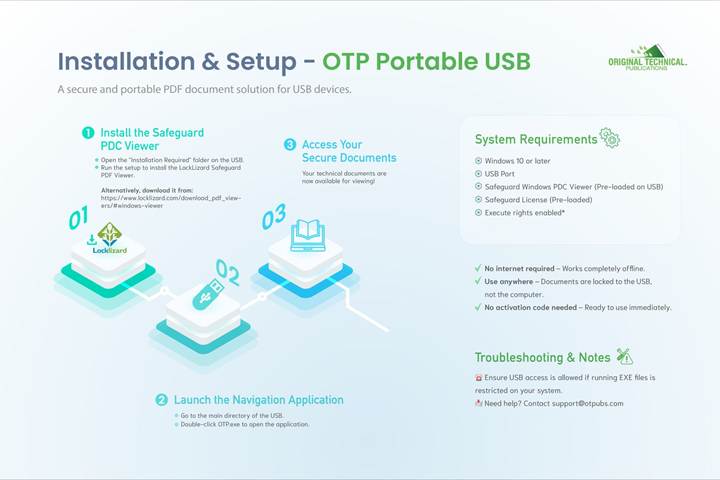
The technical documents in this software publication are provided in a protected PDF format. To view the documents included in your publication, installation of PDF Viewer is the only requirement. This can be found in a directory on the USB called “Installation Required”. Once the viewer is installed, simply launch the navigation application, called OTP.exe, which is also found in the main directory of the USB.
Original Technical Publications (OTP) PDF Portable is a portable and secure PDF document solution for USB devices (USB sticks). It can be used as a completely offline solution (no Internet access required), and since secure documents are locked to USB devices rather than to specific computers, they can be used anywhere.
For example, the OTP USB Portable digital editions can now be sold over the counter just like a normal book. And users can readily use secured information since the USB is taken with them from computer to computer.
OTP PDF Portable resolves issues of firewall access, granting administrator privileges, Internet availability, and the use of roaming profiles.
System Requirements:
- PC Windows Win 10 or later
- USB Port
- Safeguard Windows PDC viewer must be installed (pre-loaded on USB)
- Safeguard License (pre-loaded)
- Executing rights must be allowed*
* Note – Some companies prevent users from running executable files from USB devices. Since the OTP Navigation and PDC viewer applications run as EXE (executable) files on the USB device, USB access must be allowed to run on the device where the USB will be used.
Product Features:
- Printable - Print only the pages you need.
- Viewable and Zoomable
- Searchable - Search the entire section in seconds.
- Bookmarked - Manuals are bookmarked to quickly locate sections.
- Internet not required.
- Secure documents are instantly accessible just like ordinary files.
Portable or Online USB access options
Each title is now available with either portable USB or online/eBook access options. Check which fits your needs best and select your preferred option when buying.
Portable Access
- No Internet connection required, everything is on the USB key
- Plug into any Windows PC system and install the viewer software from the USB key, no activation code is required
- Resolves issues of firewall access, granting administrator privileges, Internet availability, and the use of roaming profiles
- Windows operating system only
Note – Some organizations prevent users from running executable files from USB devices. Since the OTP Navigation and PDC viewer applications run as EXE (executable) files on the USB device, USB access must be allowed to run on the device where the USB will be used.
Online/eBook access
- Access data over internet connection. An activation code to create your account as well as installation of the viewer software and license is required.
- Windows, Mac OSX and iOS as well as Android 4.0 and above compatible
- Always the latest data version online
- License allows software installation on one system or device
Which Original Technical Publications Product is best for me?
The Original Technical Publications are now available in two formats – Portable USB or USB/Online eBook
| Windows PC user | Portable USB or Online eBook with access via the URL. Note - Portable USB recommended as it can be easily moved from computer to computer. (internet not required) |
| Apple OSX user | Online access via the URL. (internet required). |
| Apple iOS user | Online access via the URL. Note - USB/Online eBook is recommended as it everything you need when using from your iPad. (works best with internet) |
| Android user | Online access via the URL. (works best with internet) |
Note - Printing not available for Apple OSX or iOS applications unless running a Windows emulation software.
Note – The Portable USB option is for use on Windows PCs only.
Note – The Online eBook is for use on all Operating Systems except Linux.
System Requirements
User must have administration rights to allow installation.
| Operating System | Requirements |
|---|---|
| PC Windows Win 7 or later | USB port, Safeguard Windows PDC viewer |
| Mac OS X 10.7 (64 bit) or above* | Safeguard OS X PDC viewer |
| iOS 8.01 and above | Safeguard Mac iOS viewer |
| Android 4.0 and above | Safeguard Android viewer |
Further details on product options
Online eBook
Each OTP product continues to provide each registered customer with a single license for one device.
If a customer registers their hand-held device (iPad, tablet or hybrid) they would ONLY have access on that device once the viewer is installed and the license is authenticated.
Product Features:
- Printable - print only the pages you need
- Viewable and zoomable
- Searchable - search the entire section in seconds
- Bookmarked - manuals are bookmarked to quickly locate sections
System Requirements:
- User must have administration rights to allow installation.
- PC Windows Win 7 or later - USB Port, Safeguard Windows PDC viewer
- Mac OS X 10.7 (64 bit) or above - Online eBook Drive, Safeguard OS X PDC viewer*
- iOS 8.01 and above Safeguard Mac iOS viewer
- Android 4.0 and above Safeguard Android viewer
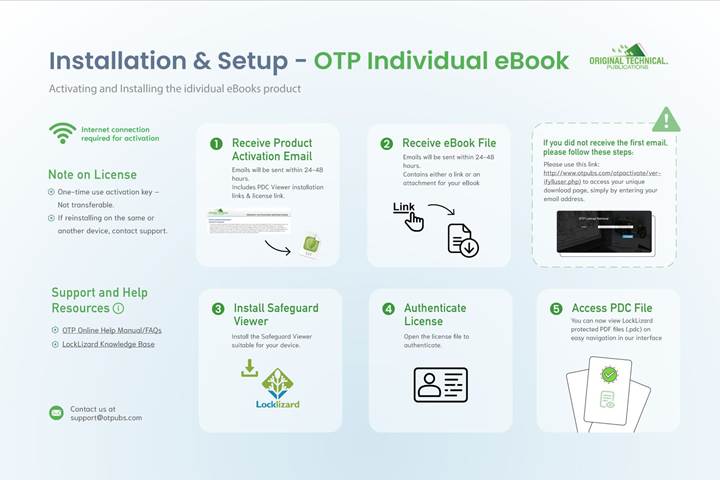
Activating your product:
1) An Internet connection is required for activation.
2) Go to the Activation Link (found on the LH Navigation Menu within the application interface).
3) Click and insert your name and a valid e-mail address plus your activation key, which you will find on the product packaging, then click ‘Activate’. Shortly thereafter you will receive an e-mail to the e-mail address that you provided, with your license file (.llv) attached and a link to download the PDC Viewer software for Mac (OSX and iOS), Windows PC or Android. (Some email clients redirect emails that contain attachments to your Spam folder, check there first if you don’t receive the email within a few minutes). If you do not receive your email please contact us at support@otpubs.com, please include your name and the email address that you used to register your product.
4) Install your appropriate Safeguard viewer first (Before authenticating your license).
5) Save (or open) the license file in an appropriate folder on your hard drive and install the Viewer software. Once installed double-click on the license file to complete registration. You will receive confirmation, after which you will be free to access documents at your leisure.
6) Note: your activation code creates your customer account and grants you access to this publication. This code is only good for one-time use and is not transferable.
7) Link to the OTP Online Help Manual or FAQs
8) Link to LockLizard Knowledge Base
9) Once you have installed and registered the Viewer and authenticated your license you can now view LockLizard protected PDF files (.pdc). Use the easy navigation in our interface to find the document that you need.
10) Your license (keystore) is authorised for use on a single device, e.g., Computer, tablet or smartphone.
11) Uninstalling and then authenticating your license (keystore) on another device or to reinstall on the same device, please contact us at support@otpubs.com.
OTP Portable USB
The technical documents in this software publication are provided in a protected PDF format. To view the documents included in your publication, installation of PDF Viewer is the only requirement. This can be found in a directory on the USB called “Installation Required”. Once the viewer is installed, simply launch the navigation application, called OTP.exe, which is also found in the main directory of the USB.
Original Technical Publications (OTP) PDF Portable is a portable and secure PDF document solution for USB devices (USB sticks). It can be used as a completely offline solution (no Internet access required), and since secure documents are locked to USB devices rather than to specific computers, they can be used anywhere.
For example, the OTP USB Portable digital editions can now be sold over the counter just like a normal book. And users can readily use secured information since the USB is taken with them from computer to computer.
OTP PDF Portable resolves issues of firewall access, granting administrator privileges, Internet availability, and the use of roaming profiles.
System Requirements:
- PC Windows Win 7 or later
- USB Port
- Safeguard Windows PDC viewer must be installed (pre-loaded on USB)
- Safeguard License (pre-loaded)
- Execute rights must be allowed*
* Note – Some companies prevent users from running executable files from USB devices. Since the OTP Navigation and PDC viewer applications run as EXE (executable) files on the USB device, USB access must be allowed to run on the device where the USB will be used.
Product Features:
- Printable - Print only the pages you need.
- Viewable and Zoomable
- Searchable - Search the entire section in seconds.
- Bookmarked - Manuals are bookmarked to quickly locate sections.
- Internet not required.
- Secure documents are instantly accessible just like ordinary files.
